Be the First Responder — L1 Production Support
By the end of this page, you will understand how L1 Support triages production alerts, follows runbooks, and escalates effectively — and how AI agents can automate first-response workflows.
Production Support (First Response) — The 2-Minute Overview
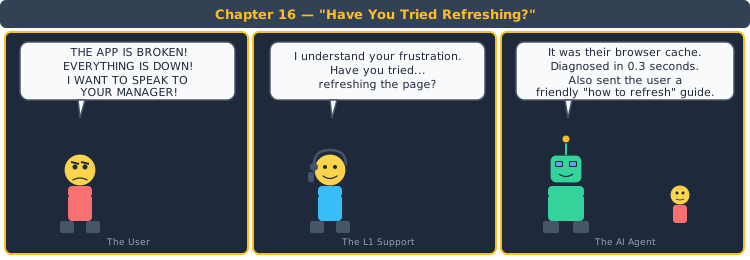
Think about the last time you called a customer support hotline. The first person you spoke to didn't redesign the product — they triaged your issue, followed a script, and either resolved it or escalated to a specialist. That first responder is L1 Support. In production systems, L1 is the first human to see an alert, follow a runbook, and decide: "Can I fix this, or does this need L2?"
You Already Know L1 Support — You Just Don't Know It Yet
You've been doing L1 support every time you helped a family member with a tech problem.
📱 The Family Tech Support Analogy
Step 1 — Triage: "What's wrong?" → "My phone is slow." → "How slow? All apps or one app?"
🔗 L1 Layer: ① TRIAGE — Determine severity and scope. Is it one user or all users? One service or the whole system?
Step 2 — Runbook: "Have you tried restarting it? Is storage full? Is there an update available?"
🔗 L1 Layer: ② RUNBOOK EXECUTION — Follow known resolution steps. Restart service? Clear cache? Check config?
Step 3 — Escalate: "I can't figure this out. Let me call your phone company."
🔗 L1 Layer: ③ ESCALATION — If the runbook doesn't resolve it, escalate with full context to L2.
The Complete Mapping
| Family Tech Support | L1 Production Support | Phase |
|---|---|---|
| "What's wrong? How severe?" | Triage: severity, scope, impact | ① Triage |
| "Restart? Clear storage? Update?" | Follow runbook: restart, clear cache, check config | ② Runbook |
| "I'll call the phone company" | Escalate to L2 with context | ③ Escalate |
You just learned L1 Support without touching a terminal.
The 4 Pillars of L1 Support
1. Alert Triage
Not all alerts are equal. Triage determines what to fix now, what can wait, and what's noise.
Categorize by severity (P0-P3), scope (one user vs. all users), and blast radius (one service vs. cascading). The first 2 minutes of triage determine the next 2 hours.
| Severity | Criteria | Response |
|---|---|---|
| P0 | System down, data loss risk | Immediate — all hands |
| P1 | Major feature broken | Within 15 minutes |
| P2 | Minor degradation | Within 1 hour |
| P3 | Cosmetic / informational | Next business day |
2. Runbook Execution
A runbook turns a 3am panic into a 3am checklist.
Runbooks are step-by-step instructions for known failure modes. "If alert X fires: check Y, run Z, verify W." Good runbooks are specific and testable. Bad runbooks say "investigate" — that's not a step.
| Runbook Quality | Example | Outcome |
|---|---|---|
| Good | "Run kubectl get pods -n payments. If CrashLoopBackOff, run kubectl delete pod " | L1 resolves in 5 minutes |
| Bad | "Check the payments service and investigate" | L1 spends 30 minutes figuring out what "investigate" means |
3. Escalation Protocol
Escalation is not failure — it's routing the problem to the right expert.
Escalate when: the runbook doesn't resolve within 15 minutes, the issue is outside L1's scope (code bug, infrastructure failure), or severity is P0 (immediate escalation regardless). Always escalate with: what you tried, what you observed, and what you suspect.
| Escalation Info | What to Include | Why |
|---|---|---|
| What you tried | Steps executed from runbook | L2 doesn't repeat your work |
| What you observed | Logs, metrics, error messages | L2 starts from data, not zero |
| What you suspect | Your hypothesis (even if wrong) | L2 has a starting point |
4. Incident Logging
If it's not logged, it didn't happen. Incident logs are the memory of your system's reliability.
Every alert, every action, every escalation — logged. This creates patterns: "This alert fires every Monday at 3am. Why?" Incident logs feed into postmortems and retrospectives.
| Log Entry | Content | Purpose |
|---|---|---|
| Alert Details | What fired, when, severity | Timeline reconstruction |
| Actions Taken | Steps from runbook | Audit trail |
| Resolution/Escalation | How it was resolved or who it was escalated to | Tracking and accountability |
The Complete Mapping
| # | Pillar | What It Answers | Key Decision |
|---|---|---|---|
| ① | Triage | How bad is it? | Severity + scope + blast radius |
| ② | Runbook | How do I fix it? | Step-by-step known resolution |
| ③ | Escalation | When do I hand it off? | 15-min rule + context transfer |
| ④ | Logging | What happened? | Every action documented |
Try It Yourself — A Starter Prompt for L1 Support
You are an L1 Production Support engineer.

I need an incident response plan for:

{{PASTE YOUR SYSTEM DESCRIPTION AND COMMON ALERT TYPES}}

Cover these 4 areas:

1. TRIAGE FRAMEWORK — Define severity levels with criteria and response times.
2. RUNBOOKS — Write runbooks for the 3 most common alerts. Each must have specific, executable steps.
3. ESCALATION PROTOCOL — Define when to escalate and what context to include.
4. INCIDENT LOG TEMPLATE — Design a log template for tracking every alert and action.

For each area, provide: the plan and a brief justification.
What This Prompt Covers vs. What It Misses
| Skill | Lite Prompt (Free) | Full Prompt (Course) | Impact of Missing It |
|---|---|---|---|
| Severity framework | ✅ Covered | ✅ Covered | — |
| Runbook structure | ✅ Covered | ✅ Covered | — |
| Automated triage (AI-assisted alert classification) | ❌ Missing | ✅ Agent classifies alerts by pattern | L1 manually reads every alert — slow triage at scale |
| Runbook validation (test the runbook before production) | ❌ Missing | ✅ Runbook testing in staging | Runbook says "restart pod" but the command is wrong. Discovered at 3am. |
| Communication templates (stakeholder updates) | ❌ Missing | ✅ Status page update templates | Incident ongoing. No status update. Stakeholders escalate independently. Chaos. |
The Lite Prompt gets you to ~60% quality. Good enough to respond to alerts. Not good enough to resolve them consistently.
Real-World Example: L1 Support for an E-Commerce Platform
The Requirement
"Design L1 support for an e-commerce platform: order processing, payment gateway, and inventory service. Handle: slow checkout, payment failures, and inventory sync errors."
Lite Prompt Output
① Triage: Payment failure = P0. Slow checkout = P1. Inventory sync = P2.
② Runbooks: Payment failure: check Stripe status page, restart payment service. Slow checkout: check DB connections. Inventory sync: re-run sync job.
③ Escalation: If not resolved in 15 min, escalate to L2 with logs.
④ Log: Alert, time, severity, actions, resolution.
What an L1 Manager Would Catch
| Area | Lite Says | What's Missing | Consequence |
|---|---|---|---|
| Triage | "Payment failure = P0" | What if 1 user's payment fails vs. all payments fail? Same severity? | 1 user's card decline marked P0. All-hands-on-deck for a typo. Severity inflation. |
| Runbook | "Check Stripe status page" | What if Stripe is up but our integration is broken? Next step? | Stripe status: green. L1 closes ticket as "resolved." Payments still failing. Users churning. |
| Escalation | "Escalate with logs" | Which logs? From which service? How to access them? | L1 escalates: "Payments are broken. Here's the alert." L2: "Where are the logs?" — 20 min lost. |
| Log | "Actions, resolution" | No customer impact tracking. How many users affected? | Postmortem: "How many customers were impacted?" L1: "We didn't track that." |
Ready to Be the First Responder?
- ✅ The complete prompt with AI-assisted triage, tested runbooks, and communication templates
- ✅ An AI agent that triages alerts and follows runbooks automatically
- ✅ Assessment + coding challenges to verify you can respond, not just describe response
Go from "I understand support" to "I can resolve production incidents at 3am."